Work Orders: Define the Work Before You Assign It
Question: What should a field-service team capture in a work order before anyone is assigned or dispatched?
1. Start with the essential fields
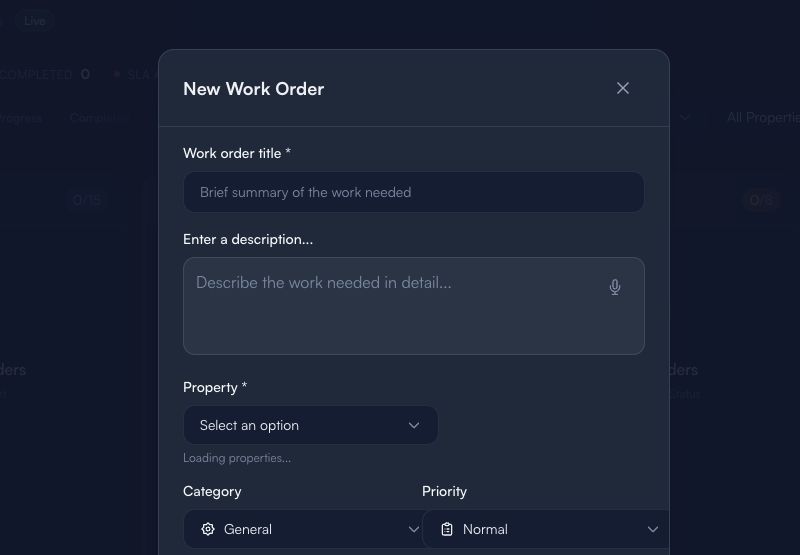
This is an empty form only. It does not show a live property, customer, assignment, estimate, cost, or job history.
Before you create a work order:
- Write a short title that describes the work, not the assumed solution.
- Add a factual description: what was reported, what is known, and what still needs checking.
- Select a property only after confirming that the selected record is correct.
- Choose category and priority using your team’s definitions; do not use priority as a promise of response time.
2. Make the handoff unambiguous
Use this mini-checklist before assigning work:
- What does the team need to inspect or complete?
- Is there a safety concern or access constraint that must be confirmed separately?
- What information is missing?
- Who owns the next decision?
- Is an estimate, part, approval, or customer confirmation required before work starts?
Keep subjective notes separate from facts. Do not paste customer conversations, access codes, credentials, or payment details into the work order.
3. Assign only when the record is ready
A ready-to-assign work order has:
- A clear outcome or inspection goal.
- The correct property selected.
- A factual description.
- A priority reviewed by the responsible person.
- Any required approval identified.
Limitations
A work order organizes a team handoff. It does not prove the scope is complete, that a technician is available, that work was performed, or that an estimate, invoice, or payment is approved. Confirm consequential decisions with a human.
Next: Inventory guide · Guides & Tips