Human Tasks: Turn an Alert Into a Clear Next Step
Question: How do I turn an operational alert into a task a person can understand, own, and complete?
1. Choose the task type first
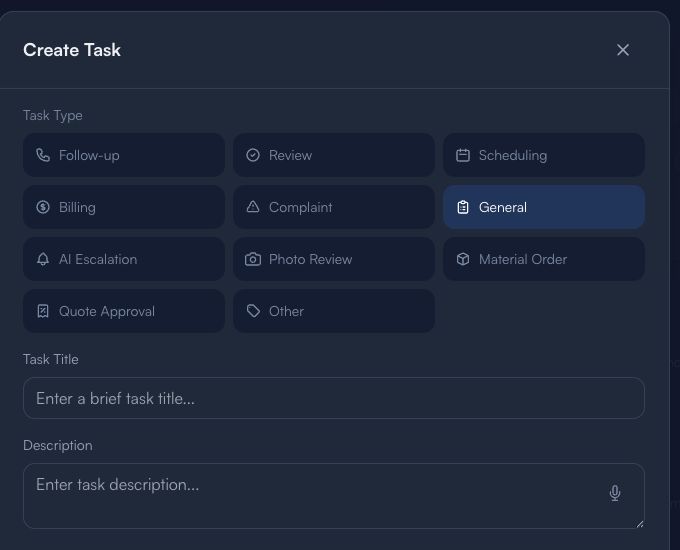
This is an empty form with generic task types only. It does not show a live alert, customer, conversation, payment, estimate, contact detail, or internal decision.
Choose the type based on what a person needs to do:
- Follow-up: a human should review the appropriate next contact.
- Review: someone must check information before it is acted on.
- Scheduling: an owner needs to coordinate time or availability.
- Billing / Quote Approval: a responsible person must validate the financial decision.
- Complaint / AI Escalation: a human must assess context; the task itself is not a resolution.
- Photo Review / Material Order: verify evidence or needs through your approved process.
2. Write a task that can be completed
Use a brief, factual title. In the description, state:
- What needs review or action.
- What is known and what is missing.
- Who should decide.
- What evidence or approval is required.
Never paste private messages, names, phone numbers, emails, access codes, credentials, payment data, or unverified claims into public content.
3. Close the loop with a human
Use this sequence:
Alert or request → Correct task type → Clear owner → Human review → Documented outcome
Before marking a task complete, confirm the action was actually reviewed by the appropriate person and any follow-up was recorded in the proper internal record.
Limitations
A Human Task is an operational handoff. It does not prove an action occurred, an issue was resolved, a customer agreed, a payment was approved, or an AI recommendation was correct. Keep consequential decisions with a qualified human.
Next: Follow-Up Queue guide · Guides & Tips