Preventive Maintenance: Schedule the Work, Then Verify the Condition
Question: How do I set up recurring maintenance without confusing a scheduled task with proof that equipment was inspected?
1. Create a clear schedule
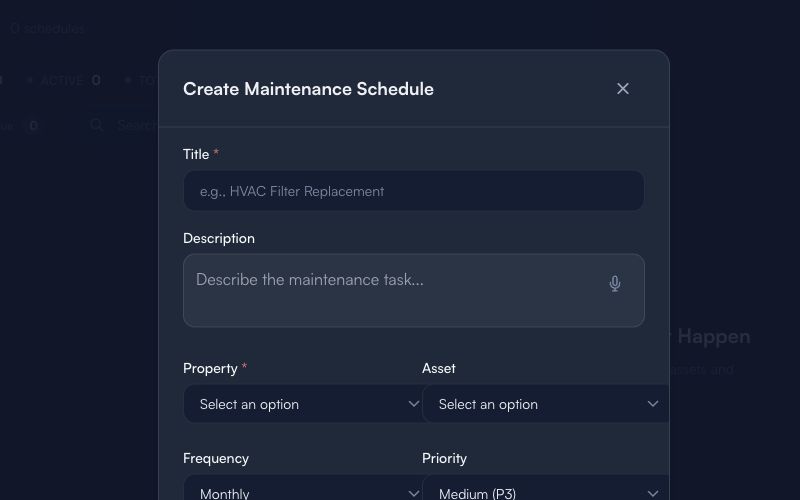
This is an empty form with generic placeholders only. It does not show a live property, asset, technician, calendar, service record, or customer.
Before saving a schedule:
- Give the schedule a specific title that describes the maintenance activity.
- Keep the description factual: what needs inspection, cleaning, testing, or review.
- Select the correct property and asset only after a human verifies both records.
- Choose frequency and priority according to your team’s approved maintenance policy.
2. Treat the schedule as a prompt
Use this sequence:
Schedule → Confirm site and asset → Perform or inspect work → Record the result → Escalate an exception
A schedule tells the team what should be reviewed. It does not establish that a visit occurred or that the equipment is in working condition.
3. Verify the condition separately
Before marking consequential work complete, confirm:
- The correct asset and location were reviewed.
- The work or inspection has an accountable owner.
- Findings are documented in the right internal record.
- Any exception has a clear next step.
- Required approval or escalation is complete.
Do not place customer data, access instructions, health information, credentials, or private contract details in public content.
Limitations
Maintenance scheduling is an organizational tool. It does not prove inspection, repair, safety, equipment condition, availability, regulatory compliance, or customer approval. Obtain qualified review for consequential maintenance decisions.
Next: Safety Standards guide · Guides & Tips